dApp mode
dApp wallet mode (beta)
Protect your crypto metadata from wallets, leaks, and censorship with the Nym mixnet
Available on:

macOS

Windows

Linux
"Wallets should connect to multiple RPC nodes, optionally through a mixnet, ideally use a different RPC node per dapp."
– Vitalik Buterin on L1 privacy for Ethereum
Crypto is not private by default. When you use a self-custodial wallet like Metamask to send or receive crypto like ETH, the wallet can associate your IP address and other metadata with your transaction. The Nym mixnet allows you to transact without censorship or metadata leakage.
What the dApp mode does
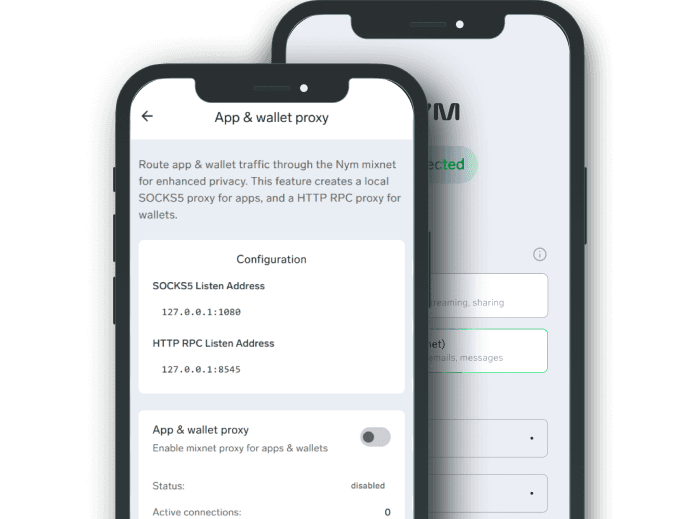
With the NymVPN dApp mode you can create a SOCKS5 and RPC node connection to the Nym Noise Generating Mixnet. Send transaction to the Ethereum blockchain via RPC nodes for maximal financial privacy.
This means you can get mixnet protections for your crypto while using the NymVPN Fast mode for the rest of your traffic. Think of it as crypto split tunneling, but with the world's most private VPN.

How a mixnet protects your crypto
Protects your transaction metadata
Blockchains use public ledgers, so the metadata of your transaction histories are fully legible.
Don't be surveilled by your wallet
Wallets have been shown to collect user data, so the mixnet helps anonymize you.
True anonymity for crypto
Privacy was never built into blockchain tech. The Nym mixnet adds the privacy infrastructure for all your transactions.
How to use the NymVPN dApp mode
Configuring your dApp mixnet tunnel
1. Connect to Fast mode in NymVPN
The goal of this feature is to split tunnel your crypto through the mixnet while using the Fast mode for everything else.
2. Activate dApp mode
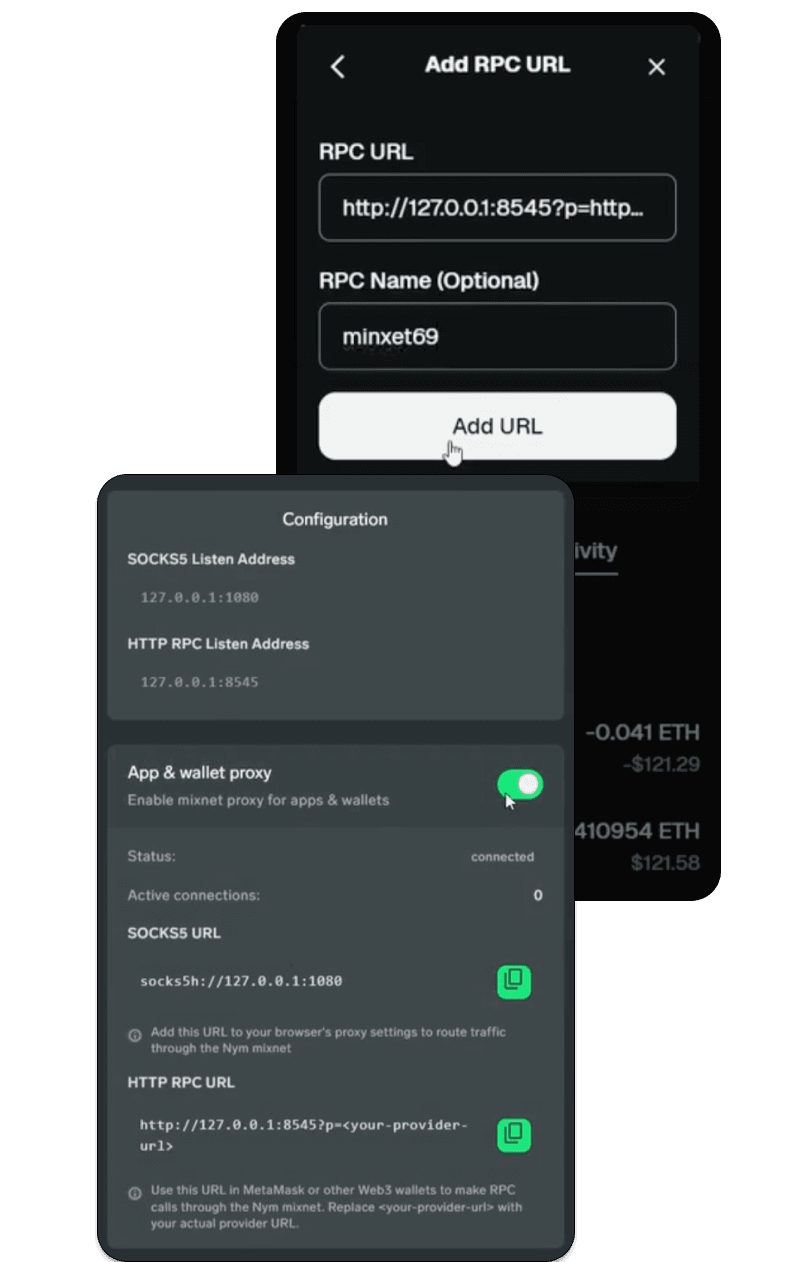
In Settings, open App & wallet proxy and toggle it on.
3. Copy RPC address
This is your SOCKS5 URL for accessing the mixnet. Copy the HTTP RPC address from NymVPN and paste it somewhere.
4. Choose an RPC node
Choose a preferred, trusted, or reliable RPC node for Ethereum. Copy the URL.
5. Add RPC node URL to the Nym RPC address
Replace the <your-provider-url> part of the Nym HTTP RPC address with the URL of your RPC node
6. Open Metamask network settings
In Settings, click Network > Ethereum > Edit
7. Add RPC URL to Ethereum
Under Default RPC URL, click Add RPC URL and then paste your modified Nym address. Click Save.
Keep reading

Split tunneling with a VPN
Split tunneling gives users flexibility and efficiency when using a VPN, but with security risks. Mixnets provide a third option.
Not just privacy, but financial security: How can a mixnet protect you and your crypto?
What Vitalik Buterin’s roadmap for L1 privacy protections means, and how Nym has built a solution
What is a mixnet? Unparalleled online privacy with a VPN
Learn how a mixnet works and how it can power the world's most private VPN

Nym is more than a VPN
The first app that protects you from AI surveillance thanks to a noise-generating mixnet
Why NymVPN's Anonymous mode provides the best privacy
Appreciating the value of technologically enhanced VPN privacy